
Art Maslow
Founder of Foxtery


One of the biggest bottlenecks in L&D is content creation. Teams are expected to build courses faster and to “use AI” to keep up, but moving from drafting content to fully automating course creation still feels like a big step.
Synthesia report shows that only 2% of respondents say they use no general-purpose AI tools, while most rely on ChatGPT (74%), Copilot (54%), and Gemini (39%).
AI is widely used just not yet trusted for end-to-end course creation.
That caution makes sense. When you’re responsible for accuracy, pedagogy, and learning outcomes, it’s hard to trust a system that feels like a black box.
I’ve spent over a decade in HR tech building an LMS, a manual authoring tool, and now an AI course creator. Having worked with all three, I’m convinced automated course creation is where L&D is heading.
In this post, I’ll walk through how the AI course creator we built at Foxtery actually works, so you can see what’s happening under the hood and trust it to handle course creation faster.
Manual vs. authoring tools vs. AI course creation
To understand why AI feels so different, it helps to compare it with the two approaches L&D teams have been using for years. This table sums up the real effort behind manual creation, authoring tools, and AI.
Effort | Fully Manual Creation | Manual Authoring Tools | AI Course Creation |
|---|---|---|---|
Reading & interpreting docs | Fully manual | Fully manual | AI processes docs |
Missing info / SME input | Long back-and-forth | Same, tool doesn’t help | Largely reduced |
Sorting & categorizing | Manual | Manual | Auto-organized |
Course structure | Manual outlining | Manual outlining | Generated instantly |
Lesson writing | Written from scratch | Written from scratch | AI drafts; L&D edits |
Role-specific versions | Built separately | Built separately | Auto-personalized |
Learning formats | Chosen manually | Chosen manually | Auto-selected |
Visuals | Manual / outsourced | Templates | Auto-generated |
Quizzes & scenarios | Written manually | Written manually | Auto-generated |
Flow & drop-off fixes | Manual rearranging | Manual rearranging | Auto-optimized |
Updates | Rewrite content | Rebuild blocks | Upload docs → update |
⏱ Time per course | 3–6 weeks | 2–4 weeks | 30–60 minutes |
With an AI course creator, the workflow compresses into just four steps:
Set the context: company, audience, and learning goals
Upload your documents
Get a structured course draft with lessons, formats, and assessments
Fine-tune and publish
An AI course creator works by first understanding the training context, then analysing your documents to build a structured view of the knowledge inside them. It applies instructional design logic, selects suitable learning formats, and personalises the content for different roles, allowing L&D teams to move from raw documents to a ready-to-use course with minimal manual work.
Now let’s look at what allows AI to do this at a consistently high level.
Setting the right context for the AI learning assistant
Before any documents are processed, the most important thing is context. The quality of the course you get depends heavily on how well the AI understands your situation.
The simple rule is: the clearer the context you provide upfront, the more accurate and relevant the course will be.
This is where you define the basics: who the company is, which team you’re training, and what people should be able to do after the course.
That context becomes the foundation for everything that follows — personalization, learning strategy, tone, examples, and assessments.
Unlike prompting in tools like ChatGPT, you’re not expected to guess what to write or how to phrase it. The AI learning assistant guides you through this step, asking the right questions and showing exactly what information is needed to produce a strong result.

You can explain everything in plain language, even by voice, and the system turns that input into structured guidance for the course.
The Knowledge Graph: how AI understands your materials
When you upload your documents, the system doesn’t summarize them - it restructures them into a semantic knowledge graph.
Here’s what happens:
Your content is broken into meaning-based chunks
The system identifies concepts, steps, relationships, exceptions, definitions
These are connected into a logical map
Lessons and assessments are generated strictly from this map
Every sentence the AI produces is cross-checked against it
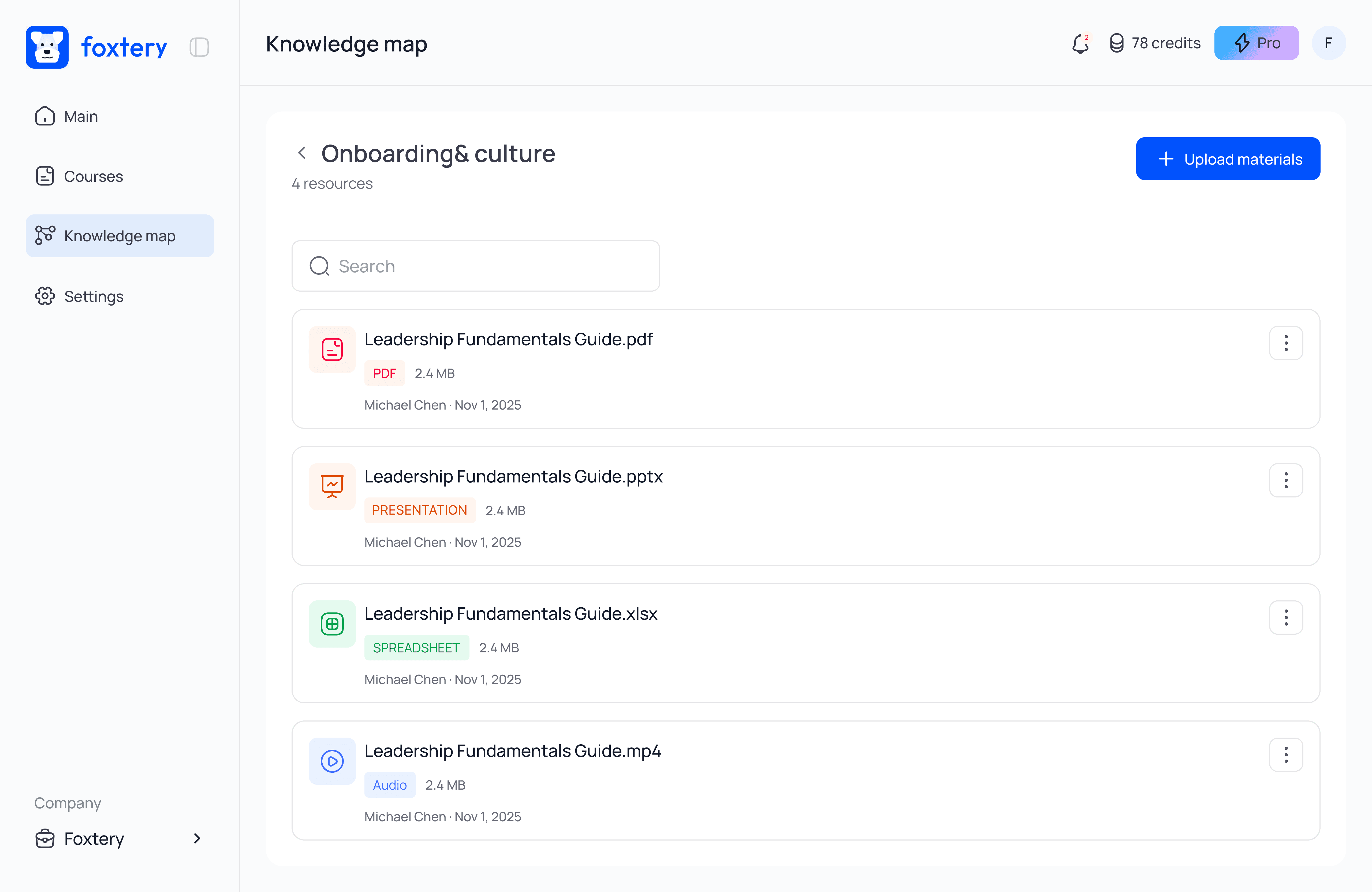
This dramatically reduces misinterpretation and keeps the final course aligned to your actual materials - not guesses, not the internet, not generic content.
This is the foundation that makes modern AI tools reliable for corporate learning.
Learning models: how AI applies instructional design logic
Modern L&D AI is trained on thousands of well-designed courses and applies instructional logic much like a PhD-level instructional design expert: by analysing your material and selecting the right learning models for the job.
1. First, the AI identifies the type of knowledge
It recognises whether the material is procedural, conceptual, behavioural or decision-based. This determines the kind of instructional approach that makes sense.
2. Then it matches that with your learning goal and audience
Based on the type of knowledge and the goal of the training, the AI selects one primary instructional methodology that best fits the course.
For example:
Upload a troubleshooting guide for technical teams → the AI may choose Gagné’s Nine Events of Instruction to ensure clear sequencing, guided practice, feedback, and reinforcement as learners move through problem resolution.
Upload onboarding for non-technical roles → the AI may select Merrill’s First Principles of Instruction, anchoring the course around real tasks and practical application from the start.
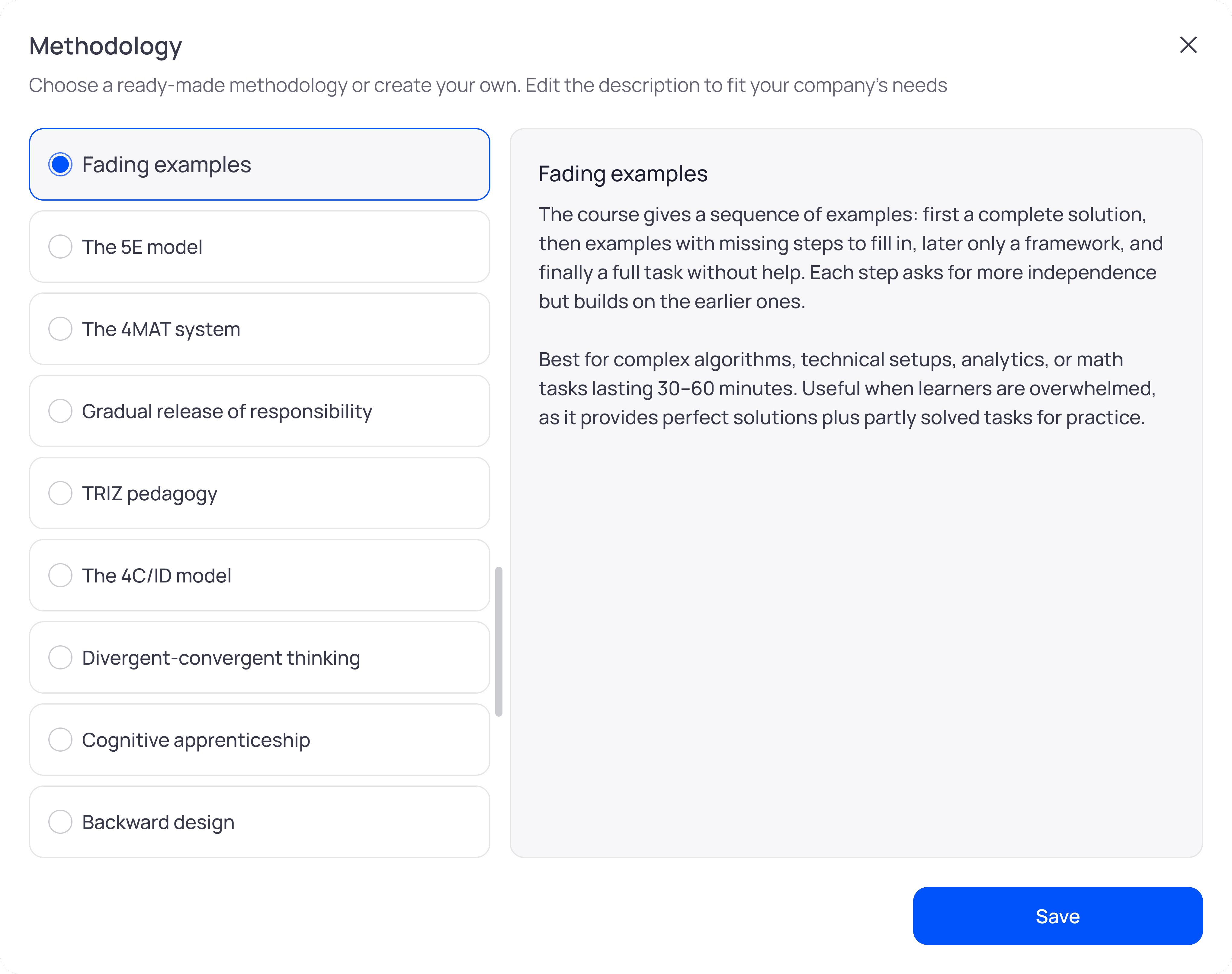
Foxtery supports more than 20 proven instructional models. The screenshot below shows a selection of them, and you can always adjust the choice or add a custom methodology before moving forward.
Course structuring: how AI sequences content for attention and memory
AI builds the course outline by mapping:
What must come first
What depends on prior knowledge
What actions must the learner ultimately perform
Then it shapes the learning flow using core cognitive principles:
Chunking: breaking content into digestible lessons
Progression: foundations → application → practice
Attention curves: placing active elements where focus dips
Reinforcement: revisiting key ideas before they fade
Onboarding becomes context → essentials → scenarios.
Troubleshooting becomes a real decision path, not document order.
The final structure feels intentional and paced for how humans naturally learn - without hours of manual rearranging
Personalized learning with AI: how roles shape course content
In traditional course creation, SME conversations translate documents into a real-world context:
What does this role actually do?
Where do mistakes happen?
Which examples feel real?
What’s essential vs. nice-to-have?
In reality, most SMEs don’t have the time for these deep conversations, which often leads to delays, shortcuts, or overly generic courses.

AI now handles much of this automatically.
Because when you define your audience — “new SDRs,” “senior support engineers,” “store managers” — the AI reshapes the material from their perspective. It:
selects examples that match their day-to-day
focuses on the parts of the content that matter most to that role
downplays what's irrelevant
anticipates typical misunderstandings
inserts clarifications or checks exactly where learners struggle
This doesn’t replace SMEs entirely — humans still refine edge cases and business nuance. But it eliminates the majority of routine clarification work that used to take hours of meetings and weeks of rework.
Learning formats: how AI selects the right interactions and assessments
AI chooses formats by analysing your content, its knowledge type, and the learner’s goal.
If it detects procedures, you’ll see step-by-step guides, demos, or simulations.
If the content is conceptual, the course uses explanations, diagrams, and short examples.
For customer-facing or judgment topics, it switches to dialogues and scenario-based learning.
In high-risk topics (compliance, safety), it adds more knowledge checks and clarifications where misunderstandings commonly occur.
And it balances these formats so the course feels coherent. It spaces out interactions, avoids repetition, and maintains a steady rhythm that keeps learners oriented.
Each part of the course gets the format that best fits how people learn that specific type of information.
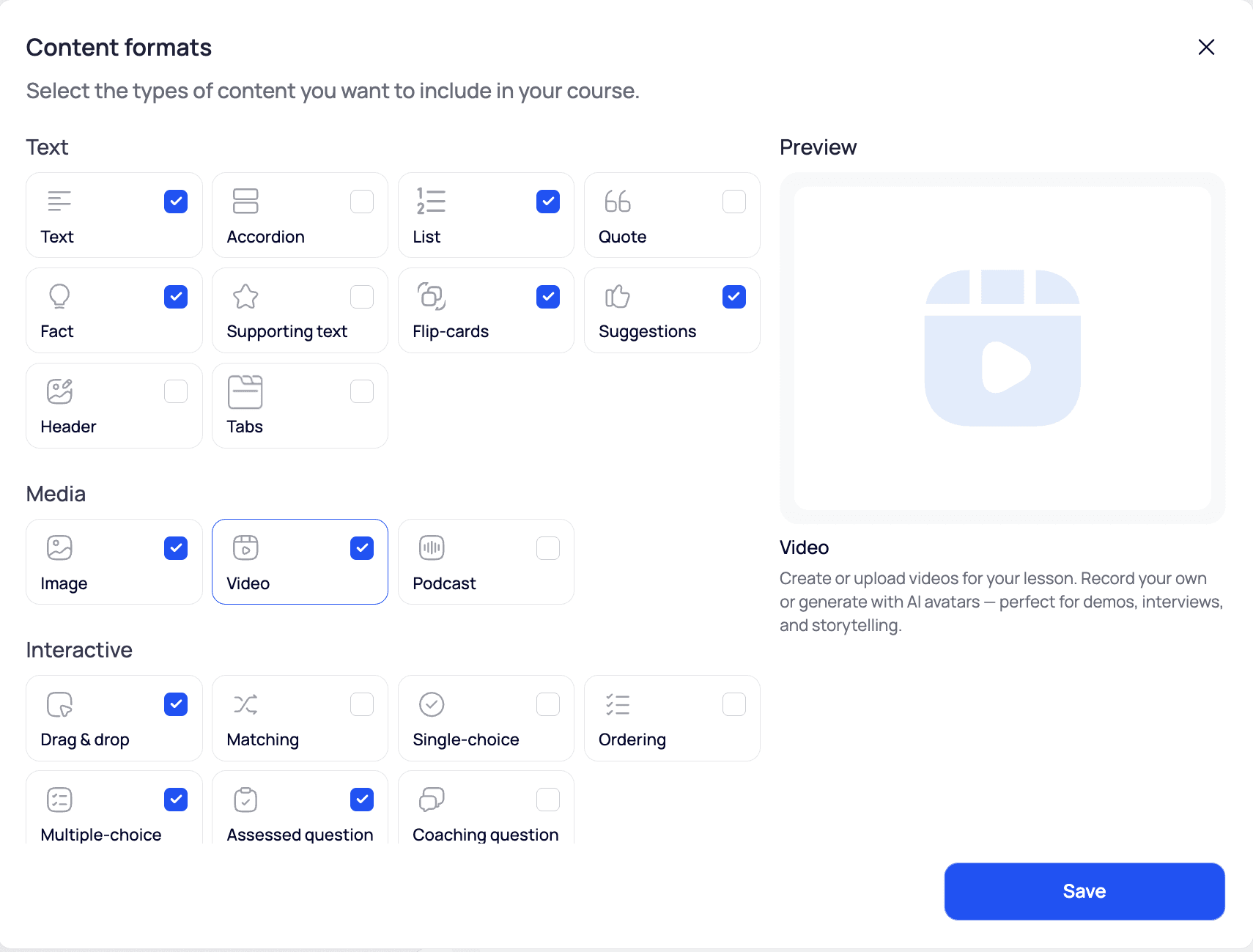
Foxtery supports a wide range of learning formats. The screenshot below shows all the formats available to match different content types with the most effective way to teach them.
How to work with an AI course creator effectively
Making the shift from manual or semi-manual tools to fully automated course creation can feel unfamiliar at first. The workflow is different, and that’s exactly why it’s so powerful. These principles can help you get the results you want.
1. Invest in context upfront
Be clear about the company, the audience, and the learning goal. The more context you give at the start, the better the structure, tone, and personalization will be across the entire course.
2. Guide the AI learning assistant as needed
You’re not prompting a blank model. You’re working with a system that proposes a structure and content. Review it, adjust it, and guide it until it matches what you have in mind.
3. Treat it as a partner
Think of the AI as an assistant that takes care of the manual work and shows you possible outcomes in seconds. You bring the expertise and judgment; it brings speed and scale.
Your turn: try AI-powered course creation
I hope this breakdown helps make the shift toward AI-powered course creation clearer and easier to navigate. Building courses faster is not just about speed. It gives L&D teams more time to focus on performance, impact, and real learning outcomes, which is becoming a clear priority for 2026 and beyond.
AI course creators are one of the most effective ways to make that shift. You are welcome to try Foxtery and see how this workflow feels for your team. And if you have feedback or ideas, feel free to reach out on LinkedIn. I would genuinely love to hear it.

