
Art Maslow
Founder of Foxtery


Product teams ship updates every week. Sometimes every day.
But product training rarely keeps up. It is still treated as something to update later, after the release, after the rush, after someone asks the same question three times.
By the time training is updated, the product has already changed again. People often learn through Slack messages, meetings, or trial and error, rather than receiving clear guidance.
The impact shows up fast:
Sales talks about features that no longer work the same way
Support gives different answers to the same question
Customers struggle to adopt what is new
Product teams repeat explanations after every release
This is why modern product training has to change. Training cannot be a follow-up task. It needs to ship with the release itself.
When training is created the same day a feature goes live, teams stay aligned, adoption happens faster, and product knowledge does not decay between releases. This shift to same-day, AI-generated product training is what allows fast-moving teams to scale without constant confusion.
What is product training?
Product training is how companies keep people aligned with how a product works as it evolves.
It often feeds into enablement, but it serves a different purpose. Onboarding happens once. Enablement focuses on improving performance over time. Product training is continuous and update-driven, designed to reflect what changed in the product this week.
Product training is created for everyone who needs accurate, up-to-date product knowledge:
Employees, including sales, support, and customer success
Customers, who need clarity to adopt new features
Partners, who represent the product externally
Effective product training programs are practical and lightweight. They focus on real workflows, common questions, and recent updates rather than long manuals or static courses.
Most importantly, product training supports product updates and releases. Every release creates a knowledge gap. Closing that gap quickly is what keeps teams aligned and makes new features actually usable.
Why product training must be role-based
The objective of modern product training is not knowledge for its own sake, but clear, measurable outcomes that differ by role.
Every product release creates different challenges for different teams. When product training is generic, those differences get blurred, leading to misalignment and inconsistent execution across the organization.
In fast-moving teams, effective product training is role-based and just-in-time. It focuses on what changed, why it matters, and how each role should act differently as a result.
How product training impacts each role
Role | What training needs to cover | Business impact |
|---|---|---|
Sales | What changed, why it matters, how to position it | Higher conversion rates, stronger upsells, faster deal cycles |
Support | New workflows, edge cases, and known issues | Faster resolution and fewer escalations |
Customer success | Adoption paths and onboarding changes | Higher feature adoption and improved retention |
Marketing & growth | Messaging updates and feature framing | Consistent launches and clearer market communication |
Customers | What’s new and how to use it | Faster time-to-value and better product experience |
This is why “train once, forget forever” no longer works. Product knowledge expires with every release.
High-performing teams treat product training as a continuous system, delivering the right training to the right role at the moment it is needed, without slowing teams down.
The core components of product training that scales with weekly releases
Product training that keeps up with weekly releases is not a single format. It is a system made up of a few repeatable components that work together.
Microlearning as the default unit
Training should be broken into small, release-sized lessons. Each update becomes a short module focused on one change, one workflow, or one decision. This makes training fast to create, easy to update, and easy to consume.Short product videos
Quick walkthrough videos, recorded with tools like Loom or generated with AI video tools, show what changed instead of describing it. Videos are faster to produce than full courses and reduce ambiguity around UI and workflows.Learning inside the workflow
Training should reach people where they already work. Slack, Teams, or in-app messages ensure updates are seen at the right moment, not buried in an LMS.An AI training bot to check understanding
An AI bot can follow up after training, ask questions, run quick quizzes, and answer product questions on demand. This replaces manual assessments and keeps product knowledge fresh between releases.A single source of truth for updates
Product knowledge usually lives across release notes, docs, and tickets. To scale product training, these inputs need to be connected in one place.
Platforms like Foxtery build a knowledge graph from existing product materials inside the AI course builder. New information is added once and all related courses are updated automatically, keeping training aligned with every release.
We explain this in more detail in our guide on how our AI course creator works under the hood.
What goes into a product training program that ships with the release
You don’t need to create training content from scratch. It’s built from materials your teams already create during product development and releases.
These inputs make fast, role-based training possible.
1. Product documentation
The release manager gathers everything that already exists:
release notes and product specs
internal docs and product tickets
AI recaps from product, support, and sales meetings
early feedback from beta users or internal testing
2. Notes on role-specific impact
A quick notes of what changed for each role.
Sales → which plans include it and how to upsell it
Support → common misconfigurations and error states
Customer success → how it affects onboarding and adoption
Customers → where to find it and how to use it safely
3. Product walkthroughs
Short videos or screen recordings showing the new workflow, created with tools like Loom or AI video tools. Below is an example of a product overview I quickly made with Synthesia.
4. Real questions and scenarios
FAQs, edge cases, and scenarios pulled from support tickets and customer calls.
The modern release-to-training cycle
Now that everything described above is in place, this is what the process of creating product training for your go-to-market teams and customers actually looks like.
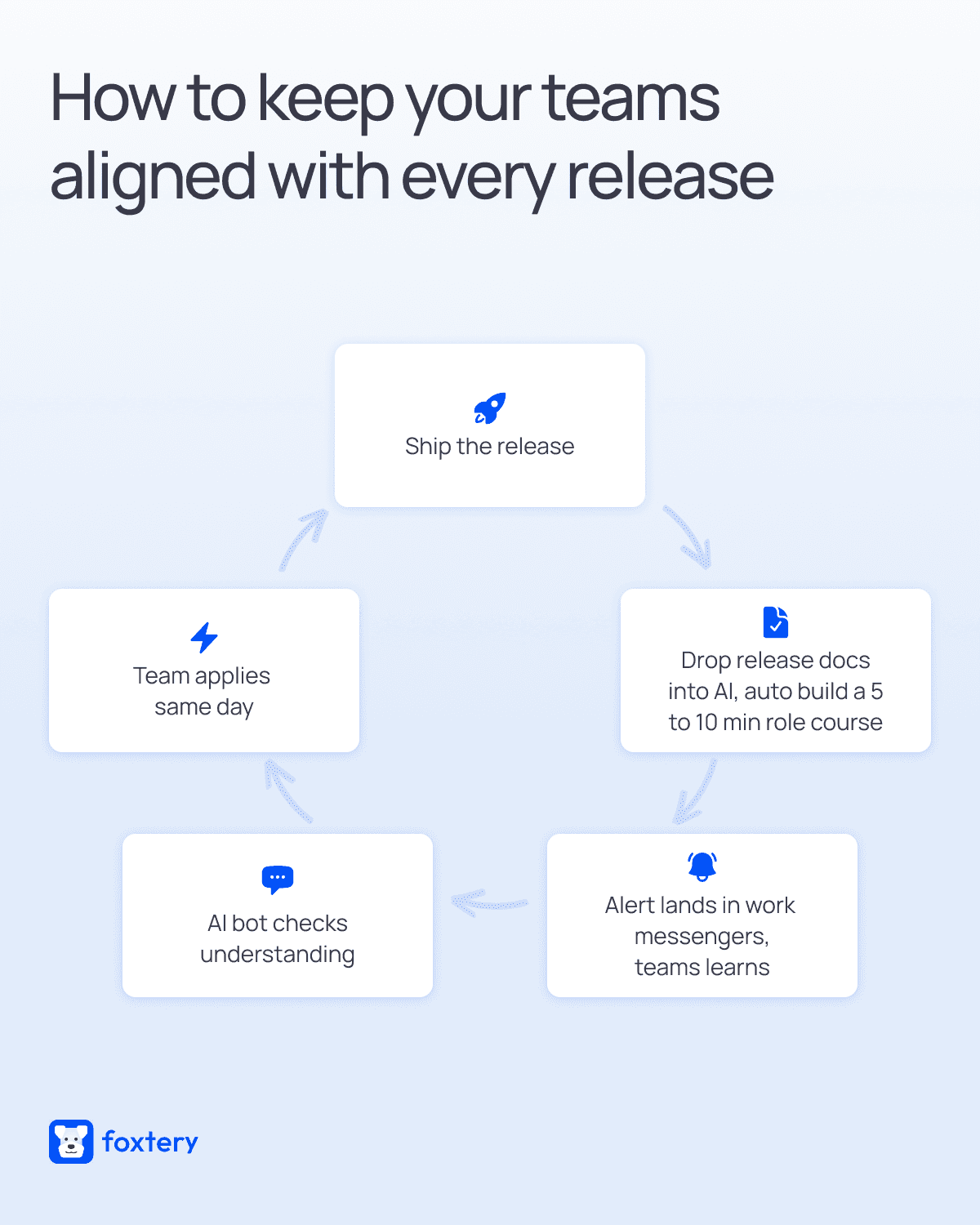
1. Product team ships the release
The release goes live. This is the trigger that starts the training cycle. There is no waiting period between shipping the product and training teams on it.
2. Drop materials into the AI course builder and generate courses
Gather all the docs we discussed above and go through five simple steps to create a course in under 30 minutes using Foxtery.
Foxtery automatically turns the inputs into 5–10 minute, role-based courses. You don’t need to know anything about instructional design. The system selects the appropriate learning model, breaks content into blocks, creates interactive formats, and adapts the course to each role you define.
If you’ve never worked with an end-to-end AI course builder before, we explain the full process in this guide.
3. Deliver training inside the workflow
Courses are delivered directly in the tools teams already use. Foxtery integrates with Slack, Teams, and Telegram, so training shows up where work actually happens instead of sitting in a separate system. Teams receive an alert and learn about the update while starting their day.
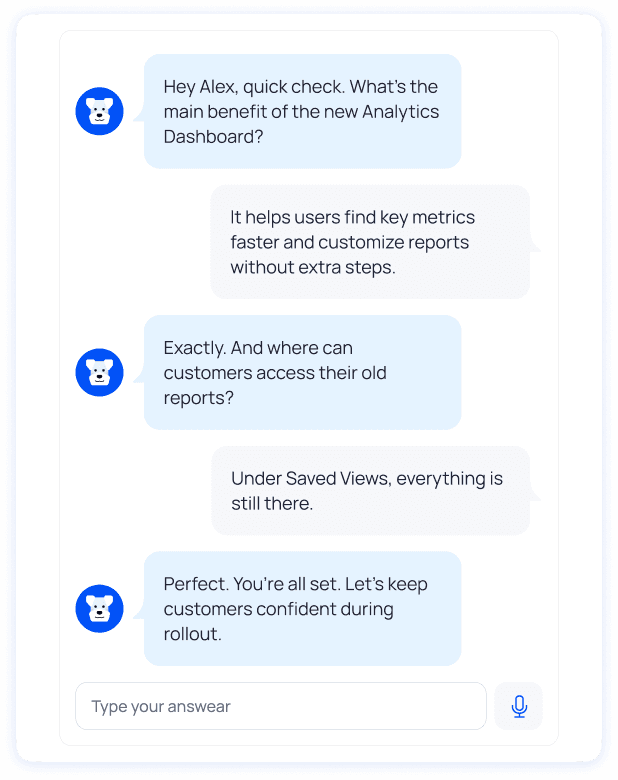
4. Automatic knowledge checks with an AI bot
Foxtery uses an AI bot to check understanding after training is delivered.
Instead of relying on course completion alone, the bot asks role-specific questions, follows up on weak areas, and answers clarifying questions in real time. This confirms that teams understand what changed and how to apply it, leading to better results from product training.
5. Teams apply changes the same day
Because training is short, relevant, and delivered instantly, teams update their messaging, workflows, and customer guidance the same day the release ships.
This cycle repeats with every release, turning product training into a built-in part of shipping the product rather than a delayed task.
Best practices for high-impact product training
Once the system and workflow are in place, the next challenge is quality. Fast product training only works if it actually helps people apply changes, not just consume information.
These principles make the difference between training that gets completed and training that changes behavior.
✔ Focus on decisions, not features
Product training that works at scale is less about content and more about behavior. The goal is not to explain every feature, but to help people make the right decisions after a release.
The most effective training highlights what actually changed and how that change affects day-to-day work. When teams understand what to do differently, adoption happens faster and confusion drops.
✔ Adapt training to roles and experience
Good product training is role-based and experience-aware. A new hire needs context and examples. An experienced teammate only needs to know what’s new.
Treating everyone the same leads to training fatigue, especially when releases happen weekly. Tailoring depth and context keeps training relevant without overwhelming teams.
✔ Use questions to reinforce learning
Questions matter more than slides. When training includes short, role-specific questions, people actively process changes instead of passively clicking through content.
AI-driven follow-ups help reinforce critical updates and surface gaps early, improving retention without adding manual work.
✔ Treat training as a living system
Product training should evolve with the product. Content updates as releases ship, outdated lessons disappear, and knowledge stays aligned over time.
Teams that get this right don’t judge success by completion rates alone. They look at what changes afterward: feature adoption, fewer support issues, and stronger sales outcomes.
Measuring product training effectiveness
When product training ships with weekly releases, effectiveness is measured by business results and learning quality, not by whether someone clicked “complete.”
Business metrics that reflect real impact
The strongest signals live outside the LMS, in the tools teams already use.
Sales performance metrics
Track conversion rates, upsells, and deal velocity after a release. If product training is effective, sales teams explain new features more clearly and adopt updated positioning faster.Where to track: CRM systems, revenue dashboards.
Support and customer success metrics
Look at ticket volume, resolution time, and repeat questions related to new features. Effective training reduces confusion early in the release cycle.
Where to track: Help desk tools, support analytics, CS platforms.Product adoption signals
Measure how quickly new features are activated and used. Faster adoption usually correlates with clearer, role-based training.
Where to track: Product analytics and usage dashboards.Customer outcomes
Watch onboarding completion, feature usage depth, and early churn signals after major updates.
Where to track: Product analytics, customer success tools.
Measuring course quality through team feedback
Business metrics show impact, but feedback shows why.
Instead of long surveys, effective teams collect lightweight, continuous feedback:
Was this training clear?
What is still confusing?
What should be explained differently next time?
Patterns in feedback reveal gaps in explanation, missing scenarios, or unclear role-specific guidance. This feedback feeds directly into the next iteration of training.
Product training has to ship with the product
Modern product teams move fast. When training moves slower than the product, it quickly becomes a liability instead of a support system.
The shift is from static LMS courses to living training systems that update with every release. Training is short, role-based, and delivered where work happens, not stored for later.
The rule is simple: if product training does not ship with the release, it is already outdated.

